

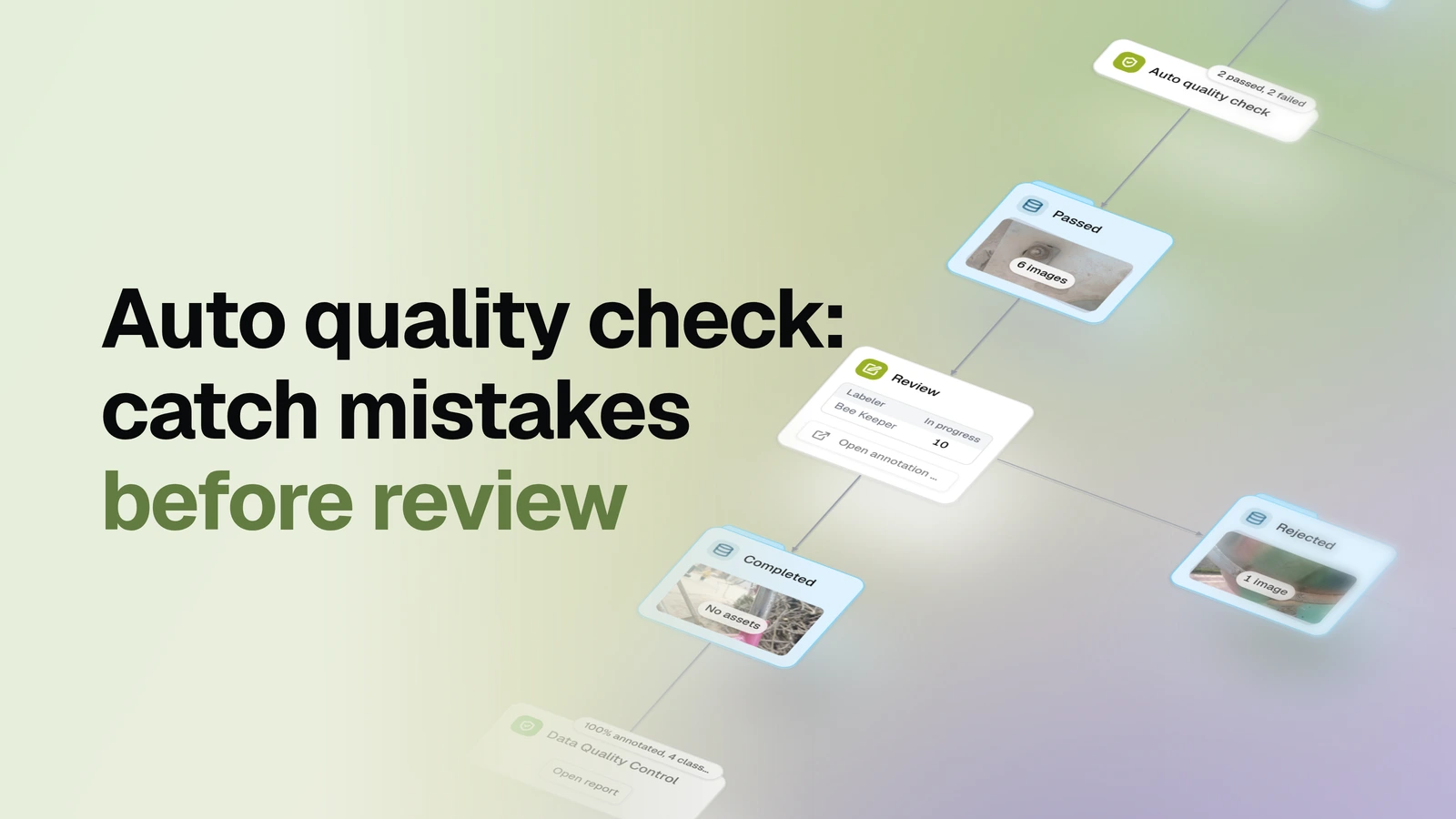
Label a pool of images inside OvalBee, with a machine gate between the labeler and the reviewer: every submission is checked against rules first, and only what passes costs a person's time.
Overview
- Task: Human-in-the-loop image annotation with an automatic pre-review quality gate
- Input: A pool of images already in OvalBee, and the class list you want labeled
- Pipeline: pick the pool → hand batches to labelers → auto-check every submission against rules → failures go straight back for another pass → a person reviews what passed → rejects go back too → the finished set is profiled
- Output: A reviewed, labeled dataset that ends profiled — plus the skipped, failed and rejected sets kept at every stage, so nothing silently disappears
When you need it
You need images labeled, and reviewer time is the scarce thing: a person looking at obviously broken submissions — an empty image, a missing class, a wildly out-of-line annotation — is review time wasted on what a rule could have caught. This template puts that rule between the labeler and the reviewer. Labeling and review both happen inside OvalBee — labelers get batches assigned, reviewers accept or reject — and between them an automatic check routes every submission: clean work moves on to review, broken work goes straight back for another pass without a reviewer ever seeing it. Everything a person decides stays a person's decision; the gate only filters what was never worth deciding on. If you'd rather run labeling through Supervisely's tooling, Supervisely queue labeling is the same accept/reject loop built on that integration.
What you need
- An image pool already in OvalBee — no external labeling tool and no accounts outside OvalBee. If your images aren't in OvalBee yet, bring them in with one of the import templates first.
- The class list to label — it drives the labelers' toolbar.
- At least one user to label and review (the same person can do both).
The quality gate ships with its checks on: images submitted without a single object or with too few objects, boxes outside a sane size range — by area share and by pixel side — and near-duplicate boxes. Every threshold is a plain node input, so tune them once you have measured your own data.
How it works
| Step | What happens |
|---|---|
| Pool | You pick the dataset of images to label |
| Define classes | One class list feeds the labeling toolbar, the review, and the quality gate |
| Label | Labelers claim batches of images; each claim expires if left unfinished, so images never get stuck with an absent labeler |
| Auto quality check | Every submitted image is checked against rules — see below — and routed to passed or failed |
| Fail loop | Failed images move back into the labeling pool for another pass, without touching a reviewer |
| Review | A person goes through the passed images, can fix labels, and accepts or rejects each one |
| Reject loop | Rejected images also move back into the pool |
| Profile | The accepted set is profiled into a statistics report, so the delivered data comes with its numbers |
How labeling works
There is no pre-labeling model: the pool goes straight to people, and the only automatic decisions are routing ones. Work is claimed in batches per labeler, with a time limit on each claim — an abandoned batch returns to the pool on its own. A labeler either submits an image labeled or skips it; skipped images are set aside in their own dataset rather than lost.
The gate between labeling and review is rule-based, not a model. As shipped it flags each submission left without a single object or with fewer objects than expected, boxes implausibly small or large for the pool — by area share and by pixel side — and near-duplicate boxes drawn over the same object; more rules can be switched on, from required classes to deviation from what's typical once enough examples accumulate in the run. Failed images carry no verdict a person has to undo: they simply re-enter the labeling pool. Review is the same claiming mechanism pointed at the passed set: the reviewer sees each image, can correct labels in place, and every verdict routes the image — accepted into the finished set, rejected back to the pool.
What a run gives you
A labeled, human-reviewed dataset that arrives already profiled — total and per-class counts, class balance, object statistics — so "what did we just produce" is a report, not a guess. Around it, every intermediate set is kept as a dataset you can open: what labelers skipped, what the gate failed, what reviewers rejected. The gate's node carries a running passed/failed count, so you can see how much reviewer time the rules are saving — and if the failed count climbs, that's a signal about the labeling instructions or the thresholds, visible mid-run rather than at the end.
The checks are rules, not judgment: the gate never accepts anything into the final set on its own — a person reviews everything that gets through — and it never deletes anything, only routes it back.
Related templates
- Supervisely queue labeling — the same label-and-review loop run through the Supervisely integration instead of OvalBee's built-in labeling: one shared queue, no automatic gate before review, and a pool that can keep arriving in waves
- Dataset quality control — the profiling step on its own, for a dataset you already have